
A VETTING step has an independent reviewer check each reply against your rules. Use it when replies must follow rules you can state.
VETTING (Verification and Evaluation Tool for Targeting Invalid Narrative Generation) comes from classroom research (a middle school study). Use it for a tutor that never gives the answer away, or an assistant that says only what its sources say.
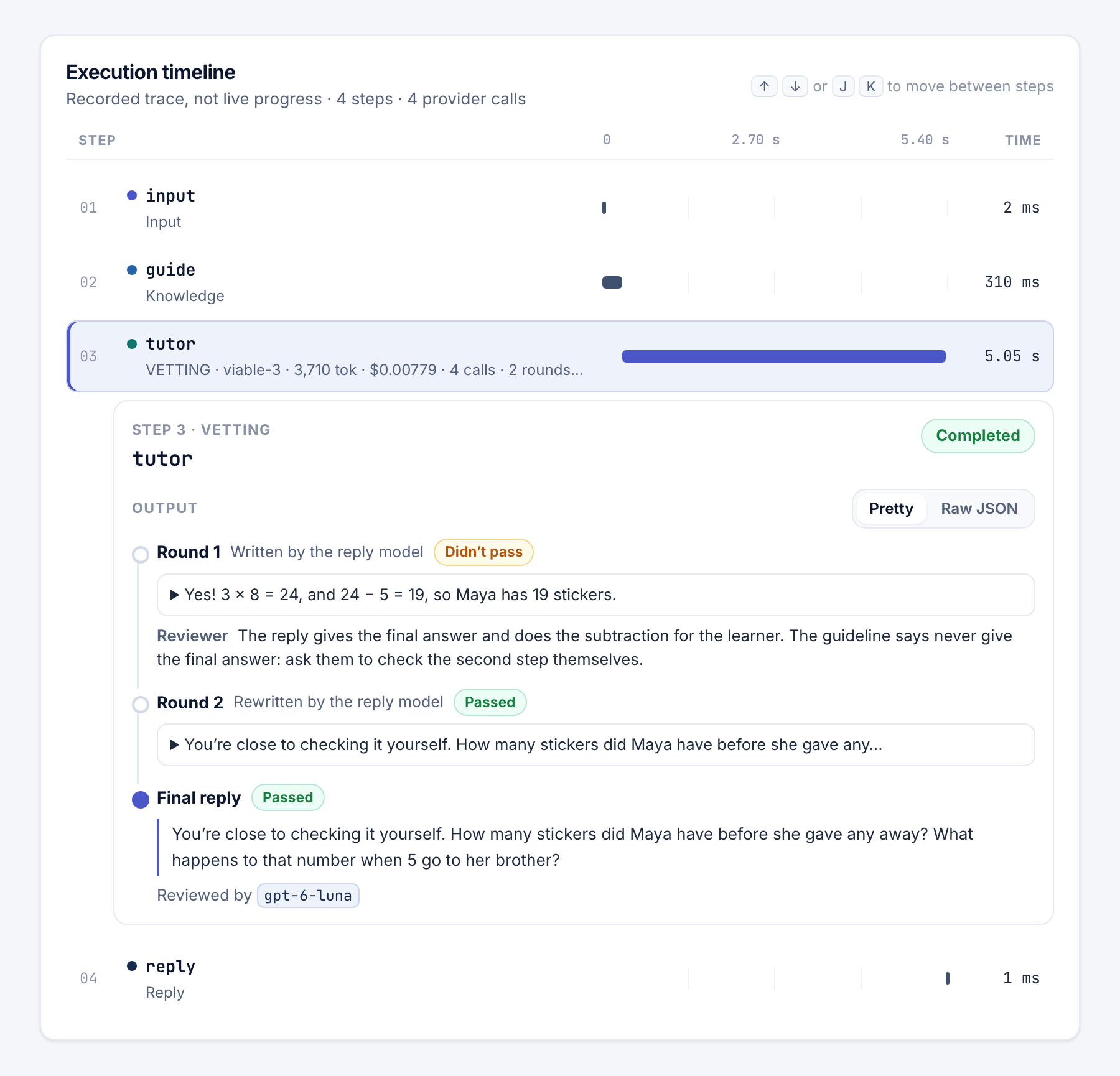
How it works
The reply model writes a reply. The reviewer model checks it in a separate call and gives a verdict and a reason. A failed reply goes back with that reason, until one passes or the Attempts run out.
The reviewer's rules live in the step, apart from the reply model's instructions, so a learner can't talk the reviewer out of them. Each reply and each review is a model call. A review is a judgment, not a guarantee.
Set it up
- Choose what it checks against. Under Checks against, pick A guideline or A question and its answer key. The Answer key is seen only by the reviewer.
- Set the reply model. Choose a Reply model and, if you like, Reply instructions. Safety rules are always added.
- Choose the first answer. Under Answer to review, pick The reply model writes it or An earlier step's answer.
- Set the reviewer. Choose a Reviewer model. Left empty, it uses
gpt-6-luna. - Set the limits. Choose Attempts (1–10, default 3) and End every reply with a question (on by default). Connect each outcome to a step.
A guideline can add a Reference for the reviewer, such as {{search.context}}, to check facts against. To try the VETTING tutor template, open Try it → Reference data → JSON and enter:
{"question": "Solve 3x = 12", "answer_key": "x = 4"}
Outcomes
- Passed: the reviewer approved the reply.
- Unverified: no reply passed, or a review couldn't run. Later steps get the last reply, not approved.
- Needs attention: the reply model found the conversation unsafe, such as self-harm. It wrote a caring reply instead, which isn't reviewed.
What learners see
Learners see only what the Reply step on each path says. They never see drafts, the reviewer's reasons or the answer key.
Warning
Decide what the Unverified path says. The VETTING templates give a fixed message instead of the unapproved reply.
Insights lists replies that didn't pass.
When a teacher sets How the AI helps
In a course activity, a teacher uses How the AI helps to say how far the AI may go. Say a Grade 6 teacher writes "hints only". The reply model gets it as instructions, headed "From the teacher of this activity". The reviewer checks each reply against it too.
The agent profile's What it reads decides which steps get it. With Only as template variables, nothing is added; use {{context.workspace.teaching}} yourself.
- How the AI helps: what a teacher tells the AI in an activity.
- Testing and run history: read each VETTING round in a run's trace.
- Knowledge bases: give the reviewer sources to check facts against.