
Connect your app once and its learners get VIABLE's research tools. Check this page after your first run and before launch.
What you get
- Insights: learners, sessions, AI use and ratings, writing, events and learner groups, day by day.
- A timeline per learner in Teach → Learners: runs, work and scores.
- The research export of your app's data alone, documented for R, Python or SPSS.
- Coding of what learners asked, by your team or a model.
- VETTING: a reviewer checks each reply against your rules.
- Studies, once your page runs in a course activity. Data your app sends alone is never in a study.
Connect it with your coding AI
- Paste the message below into Claude Code, Codex or any agent with a terminal, in your app's code.
- Review its changes. It installs the VIABLE CLI and Skill if missing, then wires your server to send
user,X-Platform-ID, traces and learning data. - Check it here. Your app appears with its checklist and Insights.
Read https://www.viablelab.org/downloads/viable-cli.md and set up VIABLE CLI and its Agent Skill if they are missing, then follow the Skill's "Connect an app to VIABLE" with https://developers.viablelab.org/docs/connect/first-run.md and https://developers.viablelab.org/docs/connect/learning-data.md: make this app's server send user, X-Platform-ID, include: ["trace"] and its learning data, then verify with viable developer apps list and viable developer apps insights <platform-id>.
What it shows
Build → Apps lists every app that sent requests or learning data with the project's keys in the last 90 days. There is nothing to register.
- An app is its
X-Platform-ID. Untagged requests are grouped by key. - Insights counts 30 or 90 days as the research export does; hover a measure for its definition. Download its data exports that app alone.
- Its requests opens Request logs filtered to the app.
- Chat pages, courses and the Playground aren't apps.
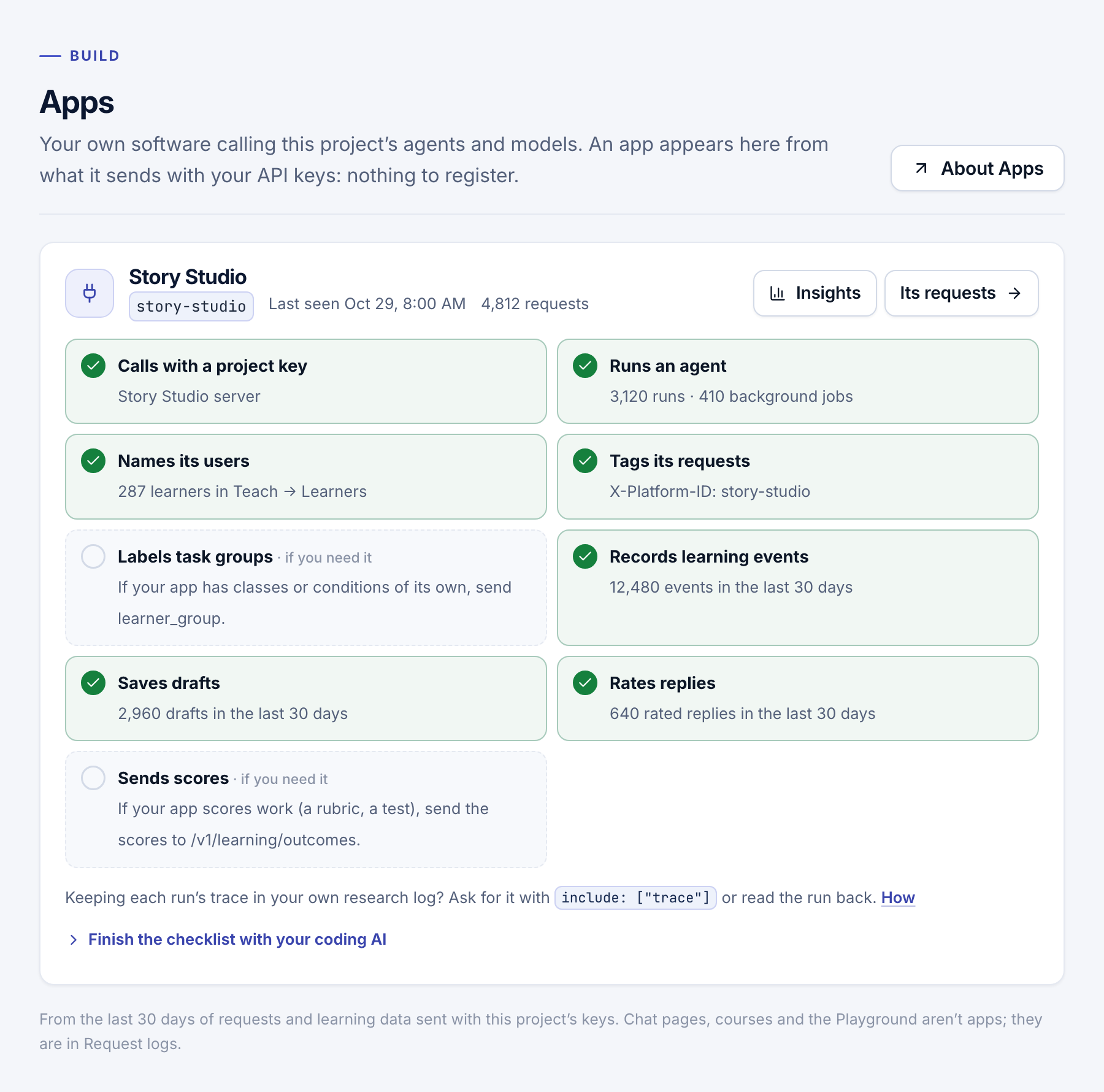
The checklist
A missing step links to its guide: Calls with a project key, Runs an agent, Names its users (user), Tags its requests (X-Platform-ID), Labels task groups (learner_group, if you need it), then the learning data rows of Send learning data.
Tag your requests
Send these optional headers from your server on every call. Choose them before launch: logs can't be re-tagged.
| Header | Use it for |
|---|---|
X-Platform-ID |
A stable ID for your app, such as writing-app. |
X-Platform-Name |
Its readable name, such as Writing App. |
X-Operation-Type |
The feature, such as give-feedback, from a small, stable set. |
X-Request-ID |
Your own correlation ID, such as a session and turn. |
const headers = {
  Authorization: `Bearer ${process.env.VIABLE_API_KEY}`,
  'Content-Type': 'application/json',
  'X-Platform-ID': 'writing-app',
  'X-Platform-Name': 'Writing App',
  'X-Operation-Type': 'give-feedback',
  'X-Request-ID': 'session-42:turn-3'
}
Values are cut at 240 characters (X-Request-ID at 200). Never put names or emails in them. Request logs filter by Platform ID, Operation and your request ID; the response's X-Request-ID is VIABLE's own, for support.
Note
Tags are labels only. They don't identify learners, enroll anyone, or change what a key may do.
- Your first run: make the call that puts your app on this page.
- Send learning data: fill the checklist's learning data rows.
- Export: download your app's data for analysis.