
In fifteen minutes you create an API key, run a published agent from your own server for one of your users, and find that run in VIABLE with its learner and its trace. Start here when your app has its own sign-in and screens and uses VIABLE agents behind them.
You need a VIABLE Developer account, a project, and a published agent in it. To make one, see Your first agent. For a first call to a model from your code, with no agent yet, the Developer quickstart takes five minutes.
Create a key and find the agent
- Create an API key. On Overview, choose Connect your app → Create an API key, or open Operate → API keys and choose Create key.
- Choose a service key. In a shared project, pick Service key: it belongs to the project and keeps working when members change. The owner creates these.
- Name it and keep its scope. Name it after the app and environment, such as "Writing App · production". Under Scopes, keep Run agents (
agents:execute). - Store the secret. Copy it from the dialog and store it on your server as
VIABLE_API_KEY. - Find the agent's address. Open the agent and choose Connect → API & keys. The endpoint is
https://api.viablelab.org/v1/agents/{slug}/runs.
A key runs the published agents of its own project. An agent in another project must grant your key on that same tab.
Run the agent for one user
user is your app's ID for the person. The X-Platform-* headers name your app.
curl https://api.viablelab.org/v1/agents/YOUR_AGENT_SLUG/runs \
  -H "Authorization: Bearer $VIABLE_API_KEY" \
  -H "Content-Type: application/json" \
  -H "X-Platform-ID: my-app" \
  -H "X-Platform-Name: My App" \
  -d '{"input": "Can you help me start my essay?", "user": "my-app:student-0001"}'
The same call in Node.js 18 or newer:
// first-run.mjs: run on your server, never in a browser.
const res = await fetch('https://api.viablelab.org/v1/agents/YOUR_AGENT_SLUG/runs', {
  method: 'POST',
  headers: {
    Authorization: `Bearer ${process.env.VIABLE_API_KEY}`,
    'Content-Type': 'application/json',
    'X-Platform-ID': 'my-app',
    'X-Platform-Name': 'My App'
  },
  body: JSON.stringify({ input: 'Can you help me start my essay?', user: 'my-app:student-0001' })
})
const body = await res.json()
if (!res.ok) throw new Error(`${res.status} ${body.error?.code}: ${body.error?.message}`)
console.log(body.output.text, body.run_id, body.conversation_id)
A successful run returns 200 with object: "agent.run.result", a conversation_id (agtc_…), a run_id (agtr_…), output, usage and cost. The reply is output.text. An error returns an error object with message, type and code. Branch on code.
Warning
The key stays on your server. Never put it in browser JavaScript, an app bundle or a repository. Your web or mobile code calls your server, and only your server calls VIABLE.
See the run in VIABLE
- Open the run. Open the agent and choose Test → Run history. Your run is at the top, marked API · runs, with a learner code (
L-…). Open it to see each step, what it received and returned, and every VETTING round. - Meet the learner. Follow the learner code to Teach → Learners. The learner shows "Known by My App (my-app:student-0001)", and the turn carries your app's name.
- Find the request. In Operate → Request logs, open More filters and set Platform ID to
my-app. You see the run and each model call inside it.
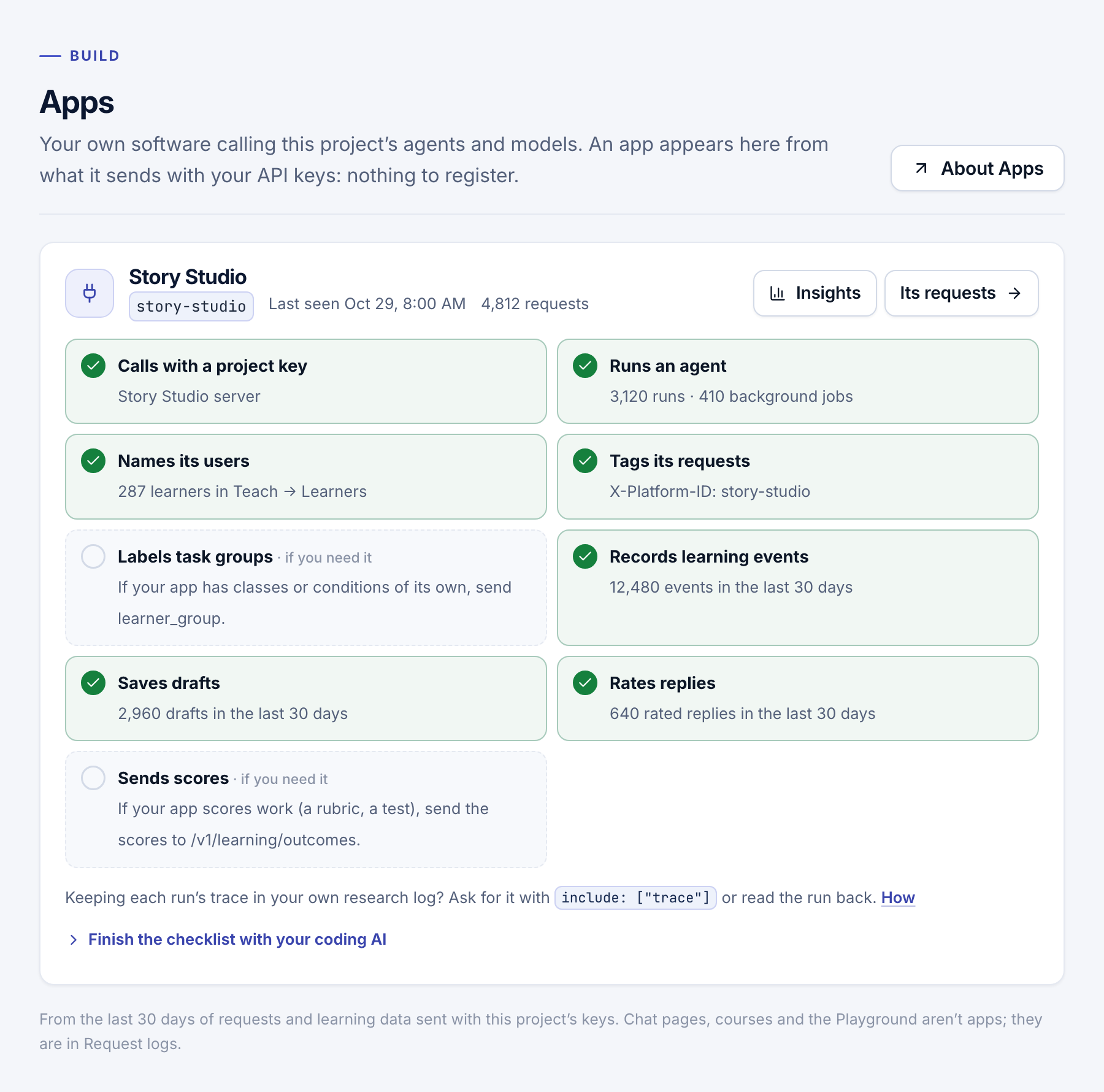
Within seconds your app also appears under Build → Apps, with its checklist.
- Learners and traces: name your users and keep a record of each run.
- Send learning data: add what learners do, write and score in your app.
- Background jobs and retries: pick a route and retry without running a turn twice.
- Build → Apps: check your app is set up the way research needs.